贡献 / #2035
#2035 Add opt-in Windows Tray for local status and diagnostics
open · draft · @medking82 · 0 评论 · 去 GitHub 看
BenchmarksSetup & installServer & APIAMD / HIPNVIDIA / CUDAModels & quantsSecurityDocumentationWindows
说明
## Title Add an opt-in read-only Windows Tray for server status and diagnostics Related feature request: #2034. ## Summary Windows users can check a running local Strata server, open its Web UI and copy a short diagnostics report from the notification area. The client is built and launched explicitly. All existing tracked engine, server, frontend and setup files remain byte-identical to base 7695859aa13afb248bdb4d36f9b2e95707db079d. ## What changed Adds `tools/windows-tray`: a .NET Framework 4.8 WinForms client, PowerShell build script, contract checks, and an illustrated operation guide. No NuGet packages or .NET SDK are required. - Anonymous loopback `/v1/models` polling with bounded timeout/body size; supports the official alias and empty-list responses. - Separate API/model status, Refresh status, Open Web UI, and Copy diagnostics. - Diagnostics omit credentials, model names, private paths, raw errors and prompts. - Official green layer-stack favicon embedded in both the executable and Tray; ICO frames range from 16 to 256 px. PerMonitorV2 and system-color status text. - Exit leaves the independently managed server running. This first PR does not manage server processes, change model settings, collect API keys, install at login or automatically update. Protected APIs report `auth required`; the browser keeps its normal authentication behavior. ### Appearance <img src="https://raw.githubusercontent.com/medking82/Strata/codex/windows-tray-20261012/tools/windows-tray/screenshots/favicon.png" width="32" height="32" alt="Official Strata favicon"> 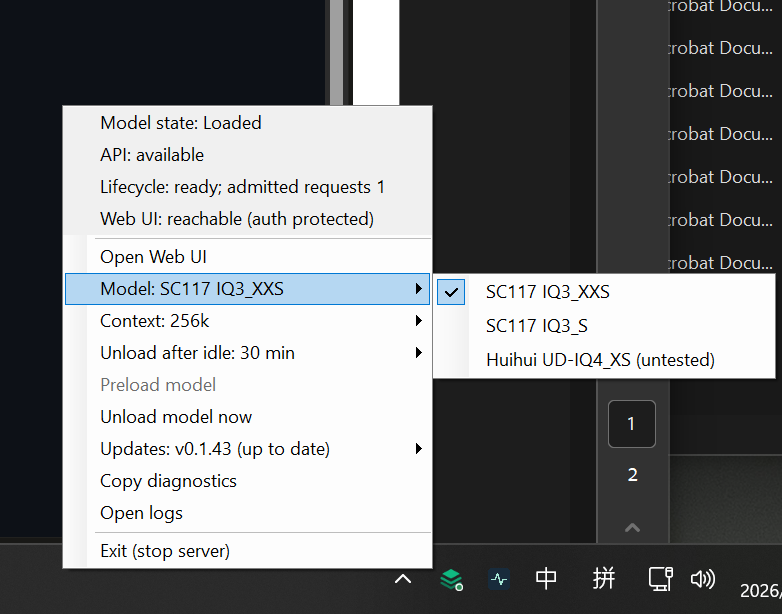 **Visual reference from the author's installed full-featured Tray, not this PR's read-only client.** This original PNG replaces the low-resolution preview and shows the shared official favicon and native menu styling. Model/context switching, idle management, updates, logs, lifecycle/Web UI status and server shutdown visible here belong to the separate local integration; they are not part of this PR. The submitted menu contains API/model status, Open Web UI, Refresh status, Copy diagnostics and Exit Tray (keep server running). ### Quick start Start the server using the existing Strata launcher, then from repository root: ```powershell .\tools\windows-tray\Build.ps1 .\dist\windows-tray\StrataTray.exe # Use the port of your running server, if different: .\dist\windows-tray\StrataTray.exe --port 8080 ``` Keep `StrataTray.exe.config` next to the executable. Right-click the green icon (in taskbar overflow if needed); double-click opens the Web UI. Copy diagnostics then paste into an issue draft and review before sharing. Exit Tray does not stop the server. [Full operation guide](https://github.com/medking82/Strata/blob/codex/windows-tray-20261012/tools/windows-tray/README.md). ## Extra Notes - 45 checks passed on Windows, including 44 fixture/DPI/privacy checks and actual compatibility with the unmodified official mock server. Native x64 build passed. - Copy diagnostics was clicked in the candidate menu; the clipboard reported API available, model loaded and HTTP 200, matching that mock server. - No CUDA/HIP/SYCL file is touched; no GPU build or inference benchmark is claimed. - Physical 4K/multi-monitor transitions remain manual validation. The current icon capture and Windows process DPI checks do not establish those results. - Kept as a Draft PR for feedback on this narrow optional client.
本站相关内容
相关页面的快捷入口。